



Every trainee I have ever taught asks about pay, usually in the last ten minutes of the last day, usually in a whisper, and usually as though it were somehow impolite. It is not impolite. It is the most practical question there is: what is this skill worth, and where is it going? A career decision made without that information is a gamble.
Yet salary information is also the most misused information in any profession. Websites quote numbers without saying where they come from. Forum posts compare people in different countries, industries and decades. Job titles do not match across companies. And outlook forecasts are read as promises when they are estimates. So in this guide I will do two things. First, I will give you solid, sourced numbers where they exist, with their limits stated. Second, I will teach you how to think about pay and demand, so you can research your own market and make your own decisions.
If you are still deciding whether this path is for you, read How to Become a Mechanical CAD Designer. For the roles behind the numbers, see Mechanical Designer vs. Mechanical Engineer vs. Drafter.
The Short Answer
There is no single “MCAD salary”. The figures depend on the occupation (drafter, designer, engineer), the country, the industry, your experience and your specialization. As a reference point for the United States, using the Bureau of Labor Statistics (BLS), the federal statistical agency, whose latest data I checked for this guide:
- Drafters: median annual wage of $68,090 in May 2025; employment projected to grow 1 percent from 2025 to 2035, slower than the average for all occupations.
- Mechanical engineers: median annual wage of $104,110 in May 2025; employment projected to grow 11 percent from 2025 to 2035, much faster than average.
- Mechanical engineering technologists and technicians: median annual wage of $68,730 in May 2024.
- For comparison, the BLS cites a median annual wage of $50,980 for all occupations in May 2025.
These numbers describe the U.S. labor market. If you work elsewhere, use them as a shape (engineers earn more than drafters; demand for pure drafting is flat, demand for engineers grows) and look up the figures for your own country. I show you how below.
How to Read Salary Data Without Being Fooled
A few ground rules that I wish someone had taught me thirty years ago.
Median versus average
The median is the middle value: half of workers earn more, half less. The average (mean) can be pulled up by a few very high earners. The median is usually the better guide to what a typical person earns.
Where the data come from
- Government surveys, such as the U.S. Occupational Employment and Wage Statistics program, collect data from employers, are carefully designed and are comparable over time. Their limits: they cover employees, not the self-employed, and they classify jobs by standard occupational categories, not by your company’s title.
- Salary websites and job boards often use user-reported figures or advertised ranges. They are quick and current, but biased: unusual jobs and unusual pay are over-represented, and titles are inconsistent.
- Professional association surveys can be excellent for specific segments, but may be paywalled and may cover members only.
- Recruiters and peers know your local market best, but each sees only a slice.
Use at least two kinds of sources, and treat a single number from a single website with suspicion.
Compare like with like
- Same occupation. “Designer” at one company may be “drafter” or “engineer” at another.
- Same region and cost of living. A salary that is comfortable in one city is tight in another.
- Same currency and period. Convert carefully, and look at purchasing power, not only exchange rates.
- Total compensation. Add bonuses, benefits, pension, paid leave, training budgets and flexibility.
- Employee versus freelancer. A freelance rate is not a salary. See Freelancing as a CAD Designer: Getting Started.
What the U.S. Numbers Say
| Occupation | Typical entry-level education (BLS) | Median annual wage | Projected employment change |
|---|---|---|---|
| Drafters | Associate’s degree | $68,090 (May 2025) | +1% (2025 to 2035) |
| Mechanical engineers | Bachelor’s degree | $104,110 (May 2025) | +11% (2025 to 2035) |
| Mechanical engineering technologists and technicians | Associate’s degree or other postsecondary training | $68,730 (May 2024) | Not covered here |
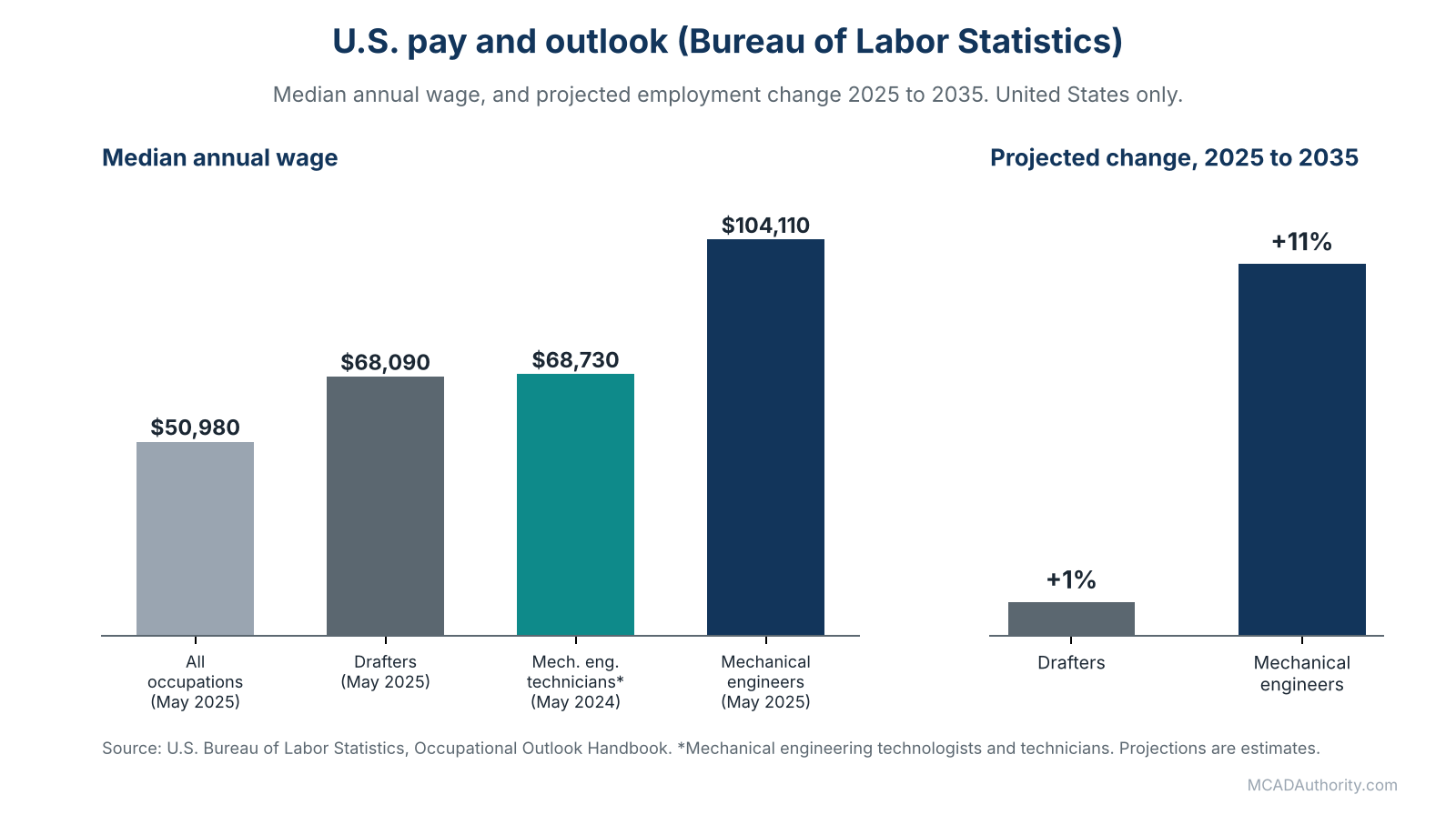
Figure 1. U.S. median pay and projected employment change (Bureau of Labor Statistics).
A few additional details I verified from BLS publications:
- Within the drafters group, mechanical drafters had a median of $68,510 in May 2024, close to the figure for all drafters.
- BLS reports about 298,500 mechanical engineering jobs in 2025, and describes the biggest employers as architectural, engineering and related services, machinery manufacturing and transportation equipment manufacturing.
- BLS notes that mechanical engineers who sell services to the public must be licensed in all states and the District of Columbia.
How to read this table
- The drafter figure includes several specialties (architectural, civil, electrical and mechanical), so it is not purely MCAD.
- Mechanical designers often fall between the drafter and technician lines on one side and the engineer line on the other. The statistics do not have a separate “mechanical designer” occupation.
- The comparison shows that pay rises with responsibility, education and accountability, which is consistent with what I describe in Mechanical Designer vs. Mechanical Engineer vs. Drafter.
The Pay Ladder Inside the Profession
Titles vary, but the pattern of growth is recognizable. I describe it qualitatively, because exact numbers differ enormously between countries and companies.
- Junior CAD technician or drafter. Modeling and drawing under supervision. Pay is typically near the lower end of technical roles.
- Mechanical designer. Complete designs of parts and subsystems. Pay rises as independence and design judgment grow.
- Senior designer or design engineer. Own assemblies, review others, make design decisions. In many companies, strong senior designers overlap in pay with early-career engineers.
- Lead designer or CAD manager. Standards, data management, training, team coordination. Pay reflects management responsibility and the value of a well-run department.
- Specialist or engineer. Deep expertise (surfacing, tolerancing, simulation, automation) or an engineering role with accountability for performance and safety.
In the offices I have managed, the largest jumps in pay came not from time served, but from a change in responsibility: owning a subsystem, taking on a standards role, becoming the person others consult. That is a lesson worth remembering when you plan your own growth.
What Moves Your Pay
If you want to earn more, these are the levers that actually work.
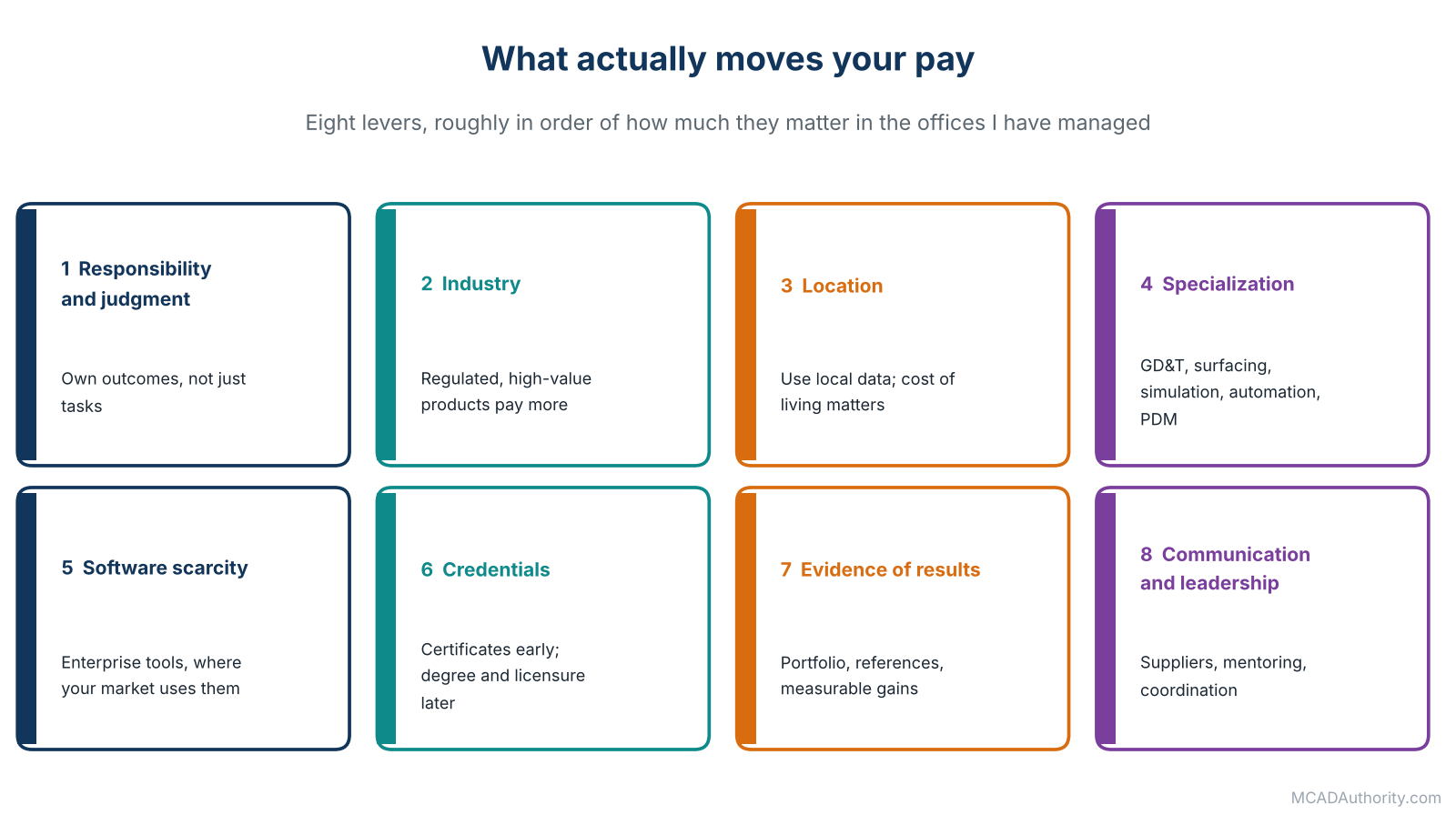
Figure 2. Eight levers that move your pay.
1. Responsibility and judgment
The more critical the decisions you are trusted with, the more you are paid. Move from “executing instructions” to “owning outcomes”.
2. Industry
Sectors with high-value, regulated or demanding products, such as aerospace, defense, medical devices, energy and advanced manufacturing, generally pay more for the same skills than low-margin or highly price-driven sectors. They also impose stricter documentation and traceability, which is part of why they pay.
3. Location and cost of living
Pay differs sharply between countries, regions and cities. Use local data. Remote work can break the link partially, but companies usually adjust to the employee’s location or to their own pay structure.
4. Specialization
Valuable specializations include GD&T and tolerance analysis, surfacing, simulation, sheet metal and weldments, plastics and tooling, data management and PDM administration, CAD automation and programming. See Mechanical CAD Automation: A Complete Guide.
5. Software scarcity
Enterprise systems used in large industrial companies (for example CATIA, NX and Creo) are less commonly learned than entry-level tools, and experienced users can be in short supply in some markets. Do not chase this blindly: choose a system that your local market uses.
6. Credentials
Certifications can help early in a career, and a degree opens engineering paths. Licensure, where applicable, can matter a great deal. See CAD Certifications Guide (CSWA, CSWP, CSWE, Autodesk, CATIA).
7. Evidence of results
A portfolio, references and a record of measurable improvements (reduced part count, faster release, fewer errors) are persuasive in negotiation. See How to Build a CAD Portfolio That Gets You Hired.
8. Communication and leadership
Designers who explain clearly, coordinate with suppliers and mentor others become indispensable, and they are paid accordingly.
The Outlook: Reading the Projections Carefully
What the BLS projects
Employment of drafters is projected to grow only about 1 percent from 2025 to 2035, slower than the average for all occupations. Employment of mechanical engineers is projected to grow 11 percent over the same period, much faster than average. Projections are estimates based on models and assumptions, not guarantees, and they refer to the United States.
Why drafting growth is flat
BLS has long observed that CAD and related technologies let engineers and architects perform tasks that used to be done by drafters, which tempers demand for drafters. In plain terms: routine, instruction-driven drawing work is the most exposed part of the profession, because software keeps making it faster and because more engineers can now produce their own models.
Why this is not a reason to panic
- A slow-growth occupation still produces job openings, because workers retire or change careers.
- The work does not vanish; it changes shape. Roles evolve from “producing drawings” to “managing models, standards, data and manufacturing information”.
- Designers with strong manufacturing knowledge, tolerancing skill and communication ability are much harder to automate than those who only convert sketches into drawings.
Where demand is commonly cited
Reports on engineering demand regularly cite manufacturing and the energy and transport transitions, aerospace and defense programs, medical devices and automation as drivers of demand for mechanical skills. Treat such lists as hypotheses to check in your own market, not as facts about your city.
Which Tasks Are Durable, and Which Are Exposed
Automation, generative design and AI-assisted tools are entering CAD practice. Here is my honest, experience-based view, which you should test against your own observations. For the AI part specifically, see Artificial Intelligence in Mechanical CAD: Applications and Limitations.
| More exposed to automation | More durable |
|---|---|
| Converting clear sketches into basic parts | Understanding ambiguous requirements and asking the right questions |
| Producing routine drawings from finished models | Deciding what to tolerance, and why |
| Repetitive variants and standard assemblies | Judging manufacturability and cost |
| Basic file conversion and cleanup | Managing change, data and release processes |
| Standard parts insertion | Designing for assembly, service and supply chain realities |
| Simple BOM generation | Communicating with suppliers, workshops and customers |
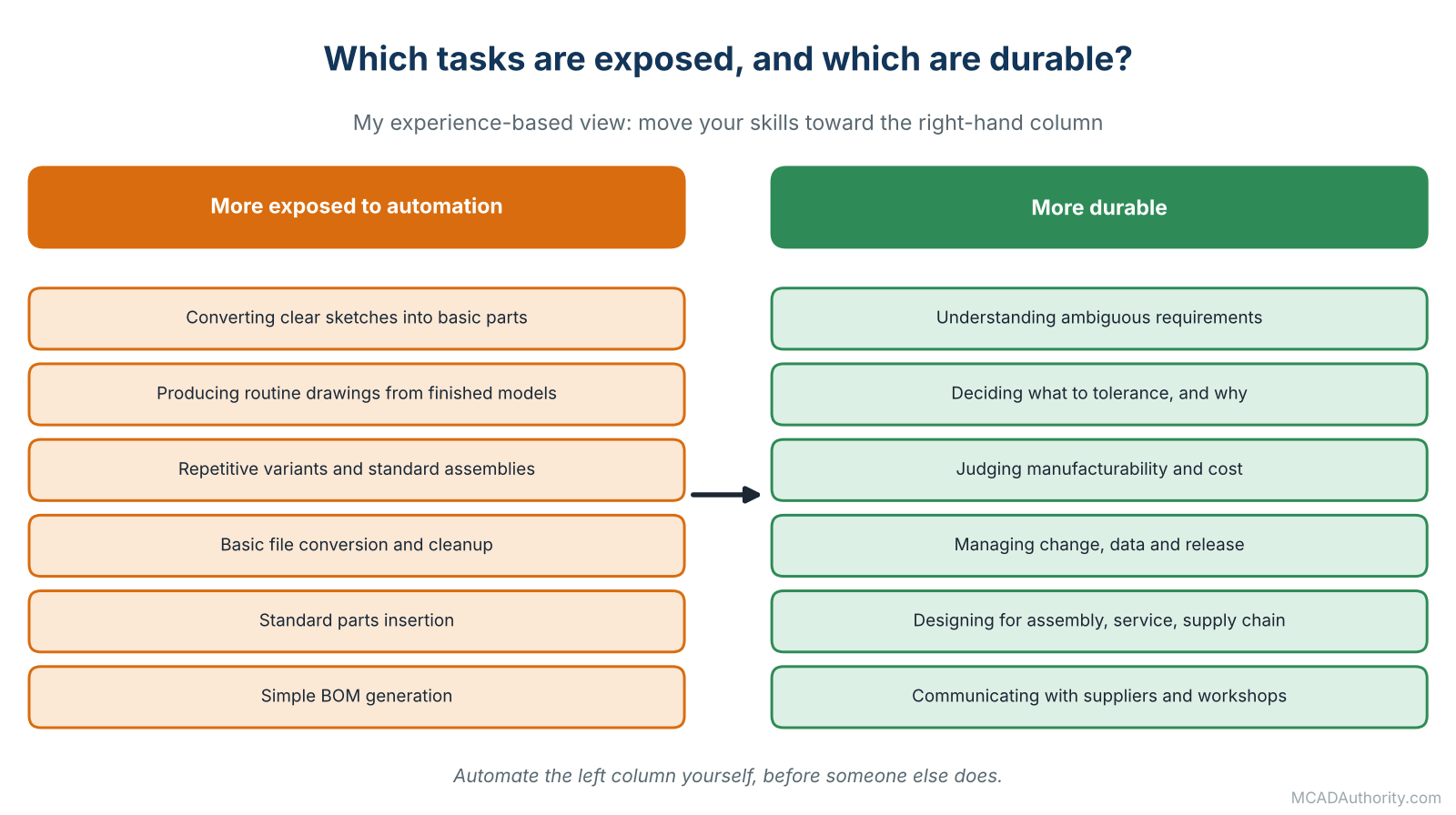
Figure 3. Tasks more exposed to automation, and tasks that are more durable.
Strategic advice: move your skills toward the right-hand column. Automate the left-hand column yourself before someone else does; the designer who builds the macros and templates becomes the expert, not the casualty.
Researching Your Own Market
Because I cannot give you your local numbers, here is the method I teach.
- Find the official statistics of your country: the labor or statistics ministry, usually with occupation-level wage data. Search for the local term for “mechanical drafter”, “technician”, “designer” and “mechanical engineer”.
- Check job advertisements. Many include pay ranges, or you can infer them from similar roles. Note required skills, software and certifications.
- Ask people. Colleagues, former classmates, teachers, local professional associations and user groups. Ask for ranges, not exact amounts.
- Talk to recruiters who place technical staff. They know the real range for specific skills.
- Look at employer reviews with caution, remembering their bias.
- Compare total compensation, not just base salary.
- Write the findings down with date, source and role, so you can compare over time and use them in negotiation.
If you are considering an international remote role, add exchange rates, contract type, taxes, benefits, time zones and the employer’s compliance obligations to your comparison.
Negotiating Your Pay
Most designers negotiate badly, or not at all. Here is what works.
Before the conversation
- Know your market range from at least two sources.
- List your contributions: projects delivered, errors prevented, processes improved, skills gained, certifications, results you can quantify honestly.
- Decide your target and your minimum, and what else you value (training, flexible hours, responsibilities, a title change).
During the conversation
- Let the employer name a number first when possible, but do not hide a range you have researched.
- Present the facts calmly: “Based on my research and on the responsibilities I now carry, I would like to discuss an adjustment to X.”
- Talk about value, not need. Your rent is your problem; your contribution is their business.
- Consider the whole package: salary, bonus, training, flexibility, role, title and review schedule.
Timing
The best moments are an offer, a review after a visible success, or a change of responsibilities. A raise requested without any evidence is much harder to win.
If the answer is no
Ask what would be needed to get a yes, and when you will review again. Get that in writing. If nothing changes, you have learned something valuable about the company.
Eight Moves That Raise Your Earning Power
- Master one system deeply, then add a second.
- Learn manufacturing: spend time in the workshop and learn two or three processes properly.
- Learn GD&T and tolerance analysis. Few designers do it well.
- Add a specialization that your industry pays for.
- Learn data management and standards, which leads toward CAD manager roles.
- Learn automation: macros, templates, configurators, scripting.
- Document your results and keep a portfolio of work you are allowed to show.
- Build relationships: with machinists, suppliers, engineers and managers. Most good opportunities come through people.
Employee, Contractor or Freelancer?
| Aspect | Employee | Contractor (through an agency or company) | Freelancer |
|---|---|---|---|
| Income stability | Highest | Medium | Lowest at the start |
| Hourly earning potential | Lowest | Medium | Highest, but with unpaid time |
| Benefits | Usually included | Usually not | You provide them |
| Learning from colleagues | Highest | Medium | You must create it |
| Freedom | Lowest | Medium | Highest |
| Administrative burden | Lowest | Medium | Highest |
A higher hourly rate is not higher income if you bill only part of your time and carry your own costs. See Freelancing as a CAD Designer: Getting Started for the arithmetic.
Common Mistakes When Thinking About Pay
- Comparing titles instead of responsibilities.
- Trusting one salary website.
- Ignoring cost of living and taxes.
- Ignoring total compensation.
- Treating projections as promises.
- Assuming a certification equals a raise.
- Staying too long in a role that no longer grows your responsibilities.
- Never asking.
- Ignoring the cost of unpaid learning time, and the value of employers who fund it.
Final Thoughts
When I look back on the careers I have watched, the people who did best financially were rarely the ones who chased the highest starting salary. They were the ones who kept increasing the value of what they could be trusted with: first a part, then an assembly, then a system, then a process, then a team. Pay followed responsibility, and responsibility followed trust, and trust came from work that was correct, clear and on time, year after year.
Use the numbers in this guide as a map, not a verdict. Check them against your own market, update them every year and keep one eye on the shape of your skills. The direction of the profession is clear: routine tasks are being automated, and judgment, manufacturing knowledge, standards and communication are becoming more valuable. Build those, and you will be paid for them.
Where to go next: read How to Become a Mechanical CAD Designer for a practical plan, and CAD Certifications Guide (CSWA, CSWP, CSWE, Autodesk, CATIA) to decide which credentials are worth your time.