



Some years ago, one of the best designers I ever trained came to see me after hours. He had just resigned. “I’m going to work for myself,” he said, half proud and half terrified. “Tell me what I’m missing.” We talked for two hours, and I wrote a list on the back of a meeting agenda. He kept that piece of paper in his wallet for years. This guide is, in a way, that list, expanded with everything I have learned since from the freelancers I have worked with, hired and advised.
Freelancing as a CAD designer can be a very good way to work: variety, independence, a direct link between the quality of your work and your income. It can also be lonely, uneven and financially dangerous if you jump without preparation. The honest truth is that the technical skill is the easy part. What breaks new freelancers is pricing, contracts, scope, cash flow and finding the next client before the current one ends.
I will walk you through readiness, services, finding clients, pricing, contracts, tools and licenses, workflow, risk and growth. If you are not yet at the stage of working alone, start with How to Become a Mechanical CAD Designer and How to Build a CAD Portfolio That Gets You Hired.
The Short Answer
You can start freelancing when you can:
- Deliver complete, correct work alone: models, drawings, BOMs and manufacturing files that a supplier can use without calling you.
- Show proof: a portfolio, references and, ideally, a few years of employed experience.
- Find and keep clients: a niche, a way of being found and a way of being paid.
- Run it like a business: contracts, invoices, taxes, backups, insurance where relevant.
Do those four things deliberately, and freelancing works. Skip one, and it usually does not.
Are You Ready? An Honest Checklist
Be sceptical of anyone who says anyone can freelance after a short course. Here is my checklist.
- You can work without supervision. Nobody will review your drawings unless you arrange it.
- You have at least two to three years of real-world experience, or a strong niche background (for example, many years in a workshop). Clients pay for confidence as much as for models.
- You know your own mistakes. If you have not yet learned the lessons in Common Mistakes Beginners Make in Mechanical CAD, you will pay for them with clients’ money.
- You understand manufacturing, so your deliveries do not generate supplier questions.
- You have a financial cushion. Many experienced advisors suggest several months of living costs saved, because income is uneven, especially at the start. Choose a number that suits your situation.
- You have a first client or a pipeline, ideally a former employer or contact.
- You can handle uncertainty and rejection without losing motivation.
A very common and sensible route is to start part-time next to your job, with permission where your employment contract requires it, and to leave only when the work is regular. Read your employment contract carefully for clauses about outside work, competition and intellectual property before you accept the first job.
What Services Can You Offer?
Think in terms of problems clients have, not software features. Here are services that I see freelance designers sell successfully.
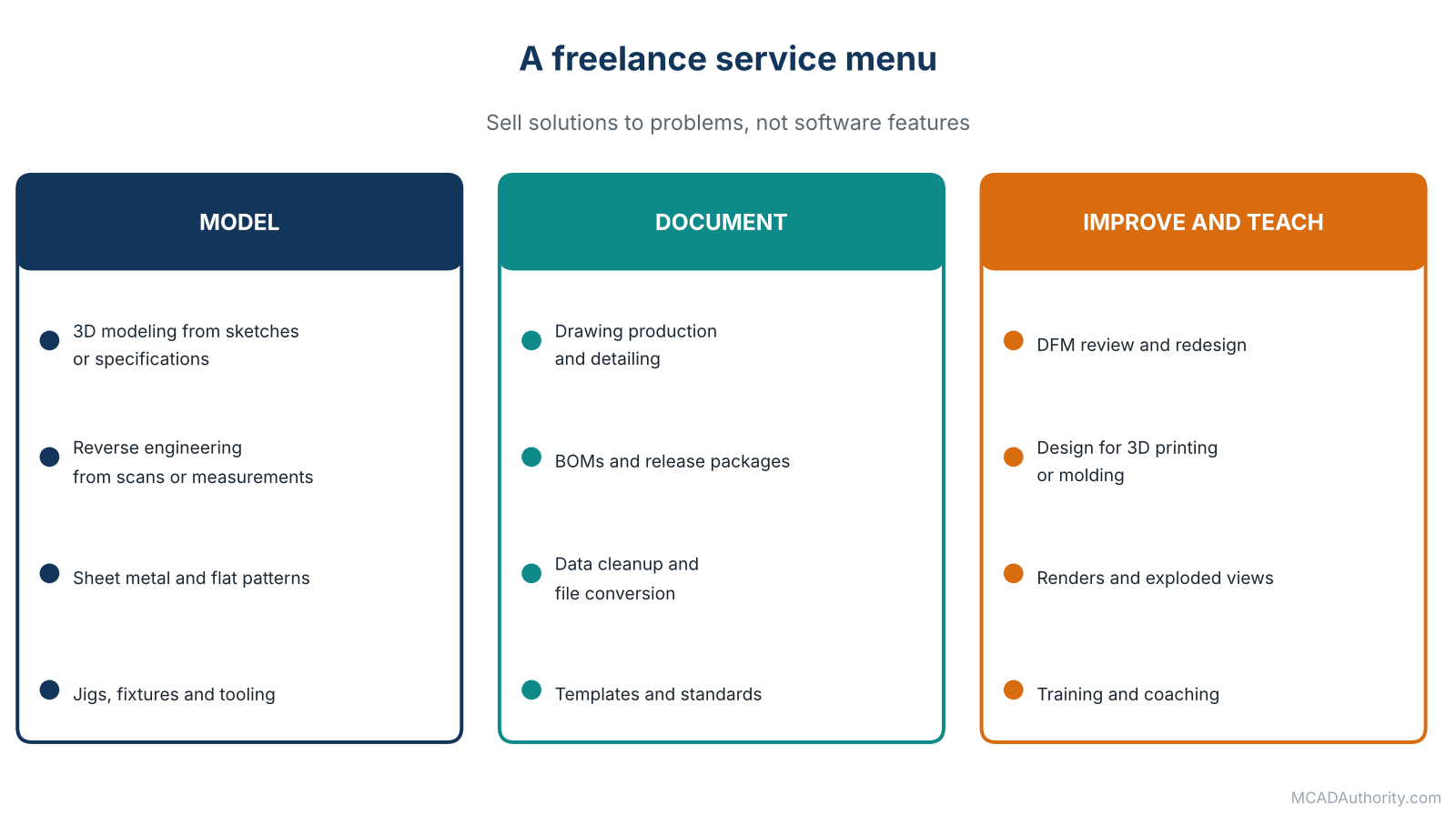
Figure 1. A freelance service menu.
| Service | The client’s problem | Typical deliverables |
|---|---|---|
| 3D modeling from sketches or specifications | “We have an idea, but no CAD capacity.” | Parametric models, assemblies |
| Drawing production and detailing | “The design exists, but no manufacturing drawings.” | Drawings, GD&T, BOMs |
| Reverse engineering | “We need a model of a part that has none.” | Rebuilt, editable CAD from scans or measurements. See Reverse Engineering: From 3D Scanning to Editable CAD Models |
| Sheet metal design and flat patterns | “Our enclosure needs to be cut and bent.” | Models, flat patterns, drawings. See Sheet Metal Design in 3D CAD: A Complete Guide |
| Design for 3D printing or injection molding | “Our prototype must become a product.” | Optimized models and drawings. See Design for Additive Manufacturing (DfAM): A Complete Guide |
| Redesign and DFM review | “Our part is too expensive or hard to make.” | Review report, redesigned parts |
| Jigs, fixtures and tooling | “We need a holding device by next week.” | Models, drawings |
| Data cleanup and conversion | “Our files are a mess.” | Standardized libraries, translated files, BOM cleanup |
| Templates and standards | “We need CAD standards.” | Templates, naming rules. See Mechanical CAD Standards: A Complete Guide |
| Visualization | “We need images or animations of the product.” | Renders, exploded views |
| Training and coaching | “Our team needs to learn.” | Courses, workshops |
A word on specializing
New freelancers often try to sell everything. Specializing works better. Choose a niche defined by an industry (packaging machinery, medical devices, furniture hardware), a process (sheet metal, injection molding) or a task (drawings for small manufacturers). A narrow niche makes you easier to find, to recommend and to trust, and clients will pay more for someone who knows their world.
Finding Clients
Early on, clients come from people who already know you. Later they come from being findable and trusted.
Your first clients
- Former employers and colleagues. Many companies are happy to outsource peaks of work to someone who already knows their standards.
- Suppliers and workshops you have worked with, who see their customers’ needs.
- Local manufacturers and startups that lack in-house CAD.
- Engineers and inventors who need a designer to turn concepts into documents.
- Your own network: classmates, user groups, professional communities.
Becoming findable
- A clear portfolio with a few relevant projects and short case studies. See How to Build a CAD Portfolio That Gets You Hired.
- A simple website that states who you help, with what, and how to contact you.
- A professional profile on a business networking platform, with the niche in the headline.
- Freelance marketplaces, useful for first projects and reviews, with the warning that they are crowded and price-driven. Treat them as a starting point, not a destination, and read their terms carefully.
- Useful content: short posts or articles about problems you solve, which show competence better than any advertisement.
- Referrals: do excellent work, then ask satisfied clients to introduce you.
What clients worry about
When I hire freelancers, my concerns are always the same: Will they understand what I need? Will they deliver on time? Will the files be clean and usable? Will they tell me early if there is a problem? Will they disappear? Address these fears in your proposals and your communication, and you will stand out.
Pricing: The Part Most People Get Wrong
Three common pricing models
- Hourly rate. Simple and fair when the scope is unclear. The risk is that clients focus on the rate, not the value, and that you are paid less if you work faster.
- Fixed price per project. Clear for the client. It demands a precise scope and good estimating. The risk is scope creep.
- Per deliverable. For example, a price per drawing sheet or per part for repetitive work. Good for standardized jobs.
Many freelancers use a hybrid: fixed price for a defined scope, hourly rate for changes outside it.
How to calculate a sustainable rate
Do not guess. Work backwards from what you need. Here is a worksheet with illustrative numbers only; replace them with your own.
- Income you want to take home, before tax. (Example: 60,000 per year.)
- Add your business costs: software licenses, hardware, insurance, accounting, training, marketing, workspace. (Example: 10,000 per year.)
- Add taxes and social contributions, which depend on where you live. Ask an accountant. (Example: 25 percent on top.)
- Divide by billable hours, not total hours. A realistic freelancer bills only a fraction of the hours worked, because the rest goes on finding clients, quoting, administration, learning and unpaid gaps. (Example: 1,000 billable hours per year.)
With these example numbers, the target is (60,000 + 10,000) × 1.25 ÷ 1,000 = 87.5 per billable hour. The point is not the figure; it is the method. Most beginners discover that the rate they first imagined is far below what they need.
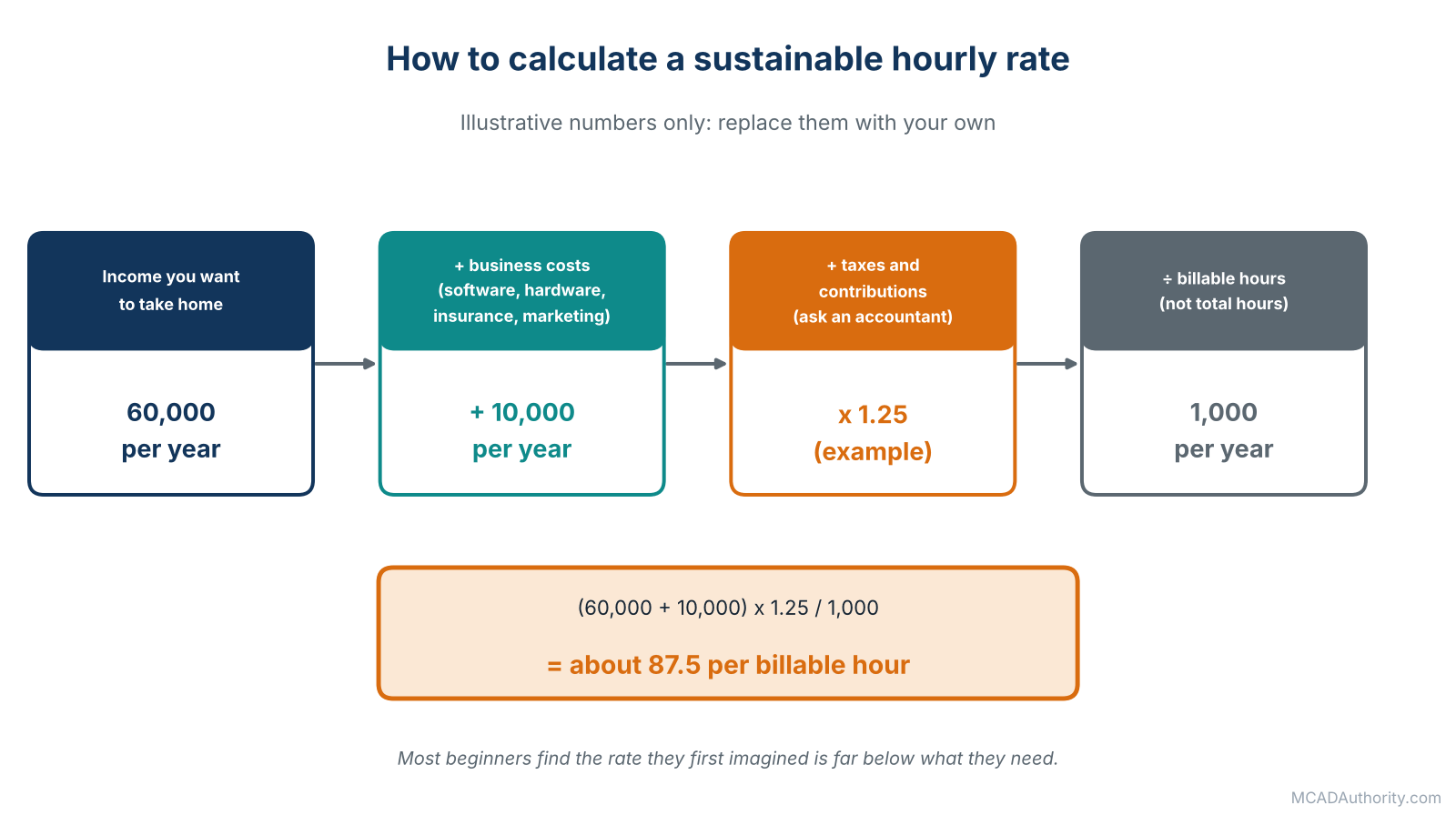
Figure 2. Rate worksheet with illustrative numbers: replace them with your own.
Practical pricing advice
- Quote with a range or with assumptions, especially for unclear scopes. “Price based on up to 3 revision rounds and the drawing set described below.”
- Never underprice to win the first job, except by deliberate, short-lived choice. Low prices attract clients who stay low-priced.
- Charge for urgency. Rush work is worth more.
- Define revisions. State how many rounds are included, and charge for extras.
- Ask for a deposit on larger projects, and invoice milestones.
- Raise your rates regularly as your experience grows and demand allows.
- Check market rates in your country and niche through peers and public sources. Do not rely on a single number from a forum.
Contracts and Agreements: Your Safety Net
A good contract is not an expression of mistrust. It is a shared understanding written down before problems appear. Always have a written agreement, even a short one. Have a lawyer or an experienced peer review your template once; the cost is small compared with a dispute.
What a project agreement should cover
- Parties and scope: who is who, what exactly will be delivered, in which formats, standards and software versions.
- Specifications and inputs: what the client provides (sketches, models, requirements) and by when.
- Timeline and milestones.
- Price and payment terms: amounts, deposits, due dates, late payment.
- Revisions: how many rounds are included, how extra work is charged.
- Acceptance: how the client approves the work and within what time.
- Intellectual property: who owns the designs and files, and when ownership transfers (typically on full payment), and what you may show in your portfolio.
- Confidentiality: a non-disclosure agreement if the client requires it.
- Responsibility and limits of liability: what you are responsible for, and what you are not. See below.
- Termination: what happens if either side ends the project early.
- Governing law and dispute resolution.
The question of engineering responsibility
This one deserves special attention. As a designer you create geometry and documentation. If the product must carry loads, hold pressure, lift people or comply with safety regulations, someone must be responsible for the engineering validity of the design, and in many places that person must be a licensed or qualified engineer. Clarify in writing:
- who defines the requirements and performs or approves the calculations;
- that your work does not replace the client’s engineering responsibility, unless you are qualified and contracted to take it;
- that you may refuse safety-critical work outside your competence.
See Mechanical Designer vs. Mechanical Engineer vs. Drafter for the distinction, and consider professional liability insurance if your work can have significant consequences. Rules vary by country, so take local advice.
Tools, Licenses and Setup
Software licensing: do not cut corners
- Use a license that allows commercial work. Student, educational and hobby licenses are generally not valid for paid work. Using them commercially risks legal trouble and, worse, losing a client.
- Check the current licensing options of the systems your clients use: standard subscriptions, startup or small-business programs, cloud tools and low-cost editions. Terms change often, so read the vendor’s current conditions rather than relying on old advice.
- Match your clients’ formats. If your clients use a particular system, being able to deliver native files is a competitive advantage; otherwise STEP files and PDF drawings are widely accepted. See Mechanical CAD File Formats: A Complete Guide.
Hardware and workspace
A reliable computer with sufficient memory and a good graphics card, a second monitor, a good mouse (a 3D mouse if you enjoy it), a backup drive and a stable internet connection. Do not overspend at the start; upgrade when work justifies it. See Best Computers and Workstations for CAD.
Business basics
- Register your activity as required where you live, and understand the tax and social security consequences.
- Open a separate bank account for business.
- Use simple invoicing and bookkeeping tools or an accountant.
- Back up everything, with at least one offsite copy. Losing a client’s files is unrecoverable damage to your reputation.
- Set a naming and folder system for projects. See Mechanical CAD File Naming and Part Numbering Standards.
A Project From Start to Finish
A healthy freelance project follows a predictable shape.
- Inquiry: the client describes the need.
- Discovery: you ask questions: function, interfaces, standards, materials, process, quantities, deadline, budget. Good questions are the first deliverable.
- Proposal: you propose scope, deliverables, schedule, price and assumptions.
- Agreement: contract signed, deposit received, inputs delivered.
- Kick-off: confirm requirements and the review plan.
- Concept check: show an early model or layout. Correct direction early.
- Detailed work: modeling, assemblies, drawings, BOMs.
- Internal review: you check your own work against a checklist, ideally with a peer. See Mechanical CAD Model Review and Quality Assurance Checklist.
- Delivery: deliver clean, named, organized files, with a short handover note.
- Revisions: within the agreed rounds.
- Acceptance and final payment.
- Follow-up: ask for feedback and a testimonial, and offer support for production questions.
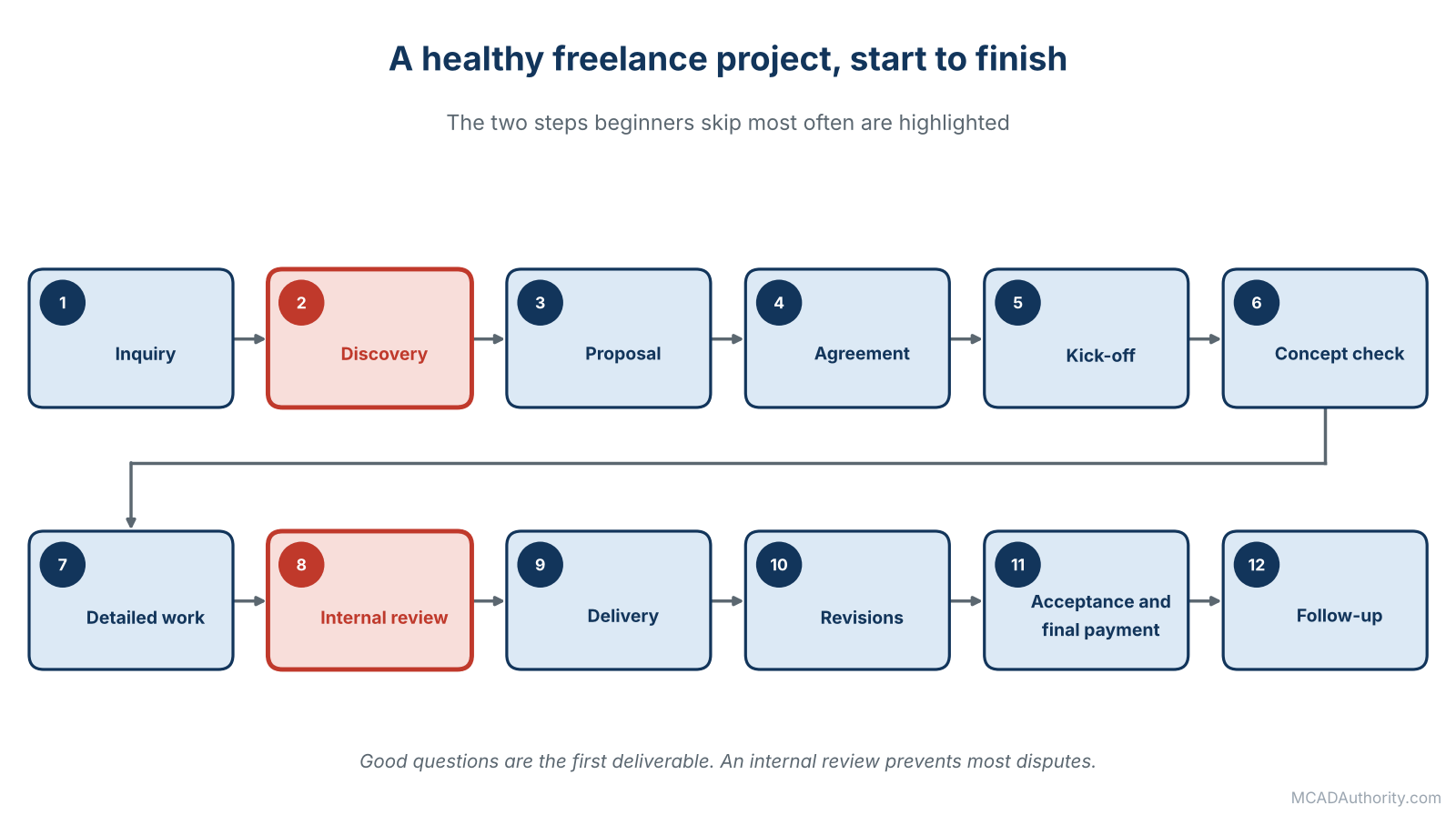
Figure 3. A healthy freelance project; discovery and internal review are the steps most often skipped.
The two stages beginners skip are discovery and internal review, and those are the two that prevent most disputes.
Working Well With Clients
- Communicate early and in writing. A short weekly update prevents most misunderstandings.
- Confirm decisions by message, so there is a record.
- Flag problems immediately: a missing input, a risky requirement, a design that will be hard to manufacture.
- Manage scope calmly. When a client asks for something extra, answer: “Yes, that is outside the agreed scope; here is the time and cost.” Say it kindly, but say it.
- Set expectations on response time, and keep them.
- Be honest about limits. Recommend an engineer or a specialist when a task is beyond your competence. Clients remember that.
- Protect the client’s confidentiality as strictly as you would your own.
Delivering Files Professionally
Your deliverables are your reputation. A client who receives an organized, clearly named package will come back.
- Native files and neutral formats, as agreed. Test the STEP by opening it in another program.
- PDF drawings matching the models, with correct revision data.
- A BOM and, if relevant, an assembly structure the client can understand.
- A short README or handover note: file list, software version, units, assumptions, known open points.
- Consistent naming and numbering, following the client’s convention if they have one.
- Clean models: fully defined sketches, sensible feature tree, no unresolved errors. See How to Build a Clean and Reliable CAD Feature Tree.
Cash Flow and Money Management
The most frequent cause of freelance failure is not lack of skill, but lack of cash.
- Invoice promptly, the day the milestone is accepted.
- State payment terms clearly, and follow up politely and persistently when they pass.
- Keep a buffer equal to several months of expenses.
- Set aside money for taxes as you earn.
- Avoid dependence on one client. If one client represents most of your income, you are an employee without protections. Aim to keep any single client below a share you can survive losing.
- Plan for slow periods: use them to improve your portfolio, templates and marketing.
Common Mistakes of New Freelancers
- Working without a contract.
- Underpricing, and then resenting the work.
- Vague scopes, which lead to unlimited revisions.
- Selling everything to everyone, instead of a niche.
- Using unlicensed or non-commercial software for paid work.
- Taking on safety-critical work beyond competence.
- Ignoring file hygiene and delivering messy packages.
- Poor communication: disappearing when problems arise.
- No backups.
- Waiting for clients to come, instead of marketing steadily.
- No separation between personal and business money.
Growing Beyond the Solo Stage
If freelancing goes well, you can grow in several directions:
- Raise your rates and narrow your niche.
- Productize services: fixed-price packages such as “drawing set for a sheet metal enclosure”.
- Create templates, libraries and standards that speed up work and can be sold or licensed.
- Subcontract overflow work to trusted peers, or build a small partner network.
- Offer training and coaching based on your expertise.
- Move into consulting: advising companies on CAD standards, data management or automation. See Mechanical CAD Automation: A Complete Guide.
- Return to employment on better terms, if you prefer. A freelance record is highly valued by many employers.
A Starting Plan for the First 90 Days
Days 1 to 30: Foundations. Define your niche and services. Prepare two or three portfolio case studies. Check your employment contract, licenses and legal registration. Draft a project agreement template and have it reviewed. Set up bank account, invoicing and backups.
Days 31 to 60: Visibility. Publish your website and profile. Tell your network what you offer. Contact ten former colleagues, suppliers or small manufacturers with a short, specific message. Create a simple proposal template.
Days 61 to 90: First deliveries. Complete one or two small paid projects with careful discovery, a written agreement and a final review. Ask for feedback and a testimonial. Update your portfolio. Adjust your pricing based on what you learned about the time actually needed.
Final Thoughts
The designer who came to see me after hours did well. He made mistakes, as everyone does: he underpriced his first two projects, delivered one late and lost a client over an unclear scope. But he learned from each, wrote a contract template, narrowed his niche and, three years later, had a waiting list. He told me recently that the best decision he made was not the resignation, but the habit of writing down what he and the client had agreed before touching the mouse.
Freelancing rewards the same qualities as good design: clarity, care, honesty and attention to the person who will use your work. Start small, protect yourself with clear agreements, price for sustainability and keep learning.
Where to go next: read MCAD Salaries and Job Outlook to place freelance rates in the wider market, and Mechanical CAD Standards: A Complete Guide to build the templates and habits that make solo work reliable.