



“Should I get certified?” is a question I have been asked on the first day of nearly every course I have taught, and my answer has not changed in twenty years: it depends on what you want the certificate to do for you. A certification can open a door, settle a debate at a job interview, justify a training budget, or give a beginner a clear goal to work toward. It cannot make you a designer, and it cannot replace a portfolio. A good certification is a receipt that you can do something under test conditions. What you do with that skill afterwards is what employers actually hire.
In this guide I will explain how the main certification programs for mechanical CAD are organized, what each level proves, how to choose among them, how to prepare without wasting time, and how certifications compare with a portfolio and a degree. I mention names and structures as they stand at the time of writing; programs evolve, so always confirm the details on the official pages before paying for an exam. If you are still planning your overall path, start with How to Become a Mechanical CAD Designer.
The Short Answer
- If you use SOLIDWORKS, the ladder is CSWA (associate), CSWP (professional) and CSWE (expert), plus specialty exams.
- If you use Autodesk products (Inventor, Fusion, AutoCAD), look at Autodesk’s Certified User, Associate, Professional and Expert programs, with exams delivered through partners.
- If you use CATIA, Dassault Systèmes offers CATIA V5 Associate and Expert exams, and 3DEXPERIENCE Associate and Professional certifications.
- If tolerancing is your craft, ASME’s GDTP certification (Technologist and Senior levels) is the best-known credential for GD&T.
- Always pair a certification with a portfolio. The certificate proves tool skill under a time limit. The portfolio proves design thinking.
What a Certification Proves (and What It Does Not)
What it proves
- You can complete defined modeling or documentation tasks, accurately and within a time limit, in a given system.
- You know the commands, features and workflows that the vendor considers essential.
- You committed time to structured practice.
- You passed an independent test, not your own claims.
What it does not prove
- That you can design: choose a good concept, balance trade-offs, make a part that can be made at a reasonable cost.
- That you understand manufacturing, tolerancing or standards, unless the exam specifically covers them.
- That you can work in a team, communicate or manage data.
- That your skills are current, unless the certification is renewed or recent.
Hiring managers know all this. In my experience a certification is treated as a tie-breaker and a filter: it can move a resume from the “maybe” pile to the “interview” pile, especially for early-career candidates and for roles in companies that use that specific software. But it will not rescue a weak portfolio.
The SOLIDWORKS Program: CSWA, CSWP, CSWE
SOLIDWORKS runs one of the most widely recognized certification ladders in mechanical CAD. The names and branding have evolved over time (SOLIDWORKS’s own pages now describe some of the exams with “Design” titles), but the structure is stable. Check the official site, solidworks.com/certifications, for the current catalog.
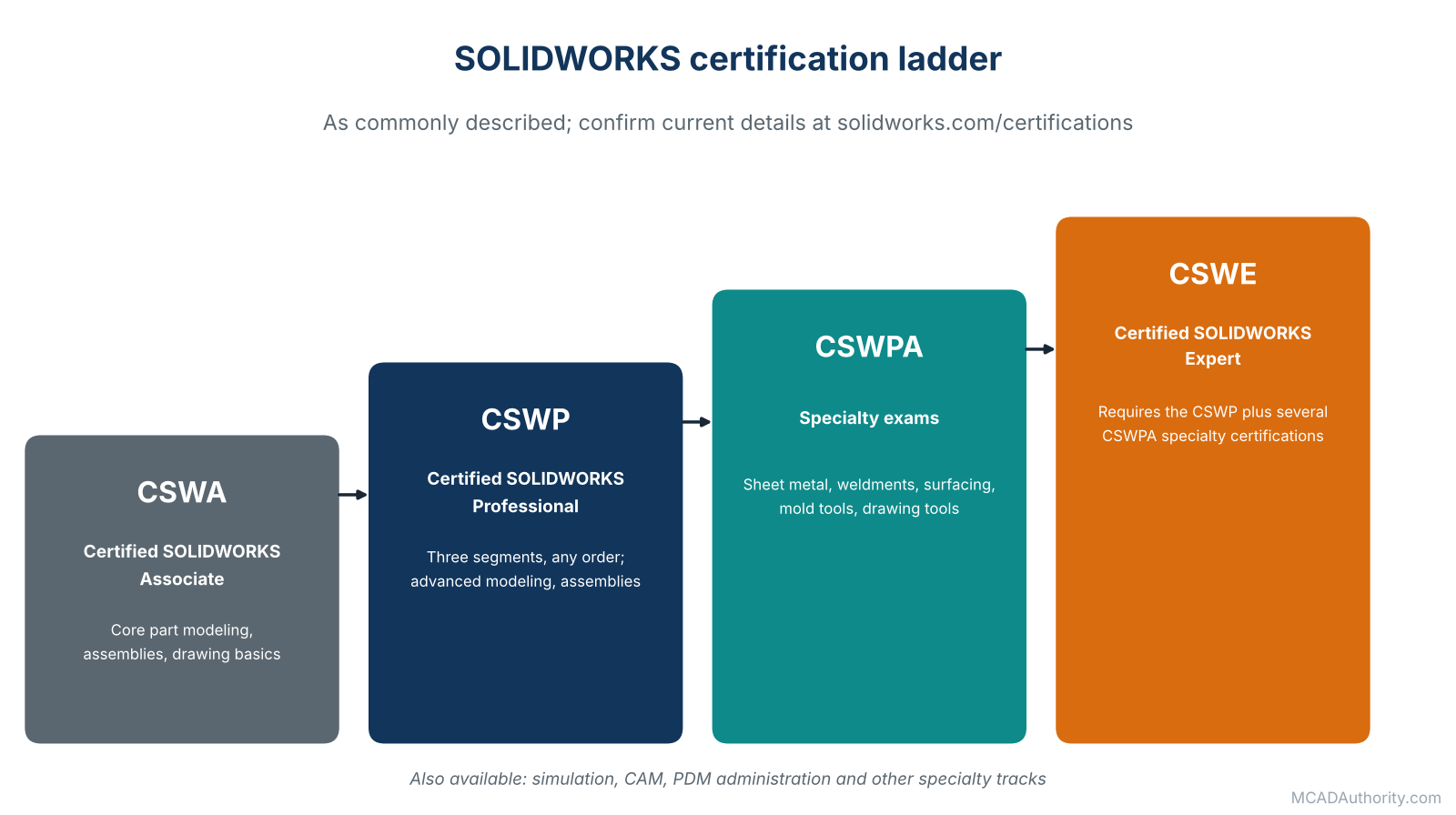
Figure 1. The SOLIDWORKS ladder, as commonly described; confirm current details with the vendor.
CSWA: Certified SOLIDWORKS Associate
- Level: entry.
- Focus: core part modeling, assemblies and basic drawing knowledge.
- Who it suits: students, beginners and people changing careers who want a clear first target.
- Format: a timed, hands-on exam in SOLIDWORKS. Published guides have long described a three-hour exam with a passing score of about 70 percent, and a waiting period before a retake. Confirm the current figures before you register.
CSWP: Certified SOLIDWORKS Professional
- Level: intermediate. This is the one most commonly requested in job advertisements that mention a certification.
- Focus: more advanced modeling, design intent and editing, and assembly work.
- Format: the CSWP is made up of three segments that can be taken in any order and at any time; when all three are passed the certification is awarded. Published guides describe passing scores of around 75 percent per segment. Again, verify.
- Who it suits: working designers who use SOLIDWORKS daily.
CSWE: Certified SOLIDWORKS Expert
- Level: advanced.
- Prerequisites: as commonly described, the CSWP plus several specialty exams (the CSWPA family, which cover topics such as sheet metal, weldments, surfacing, mold tools and drawing tools).
- Format: a long, demanding exam with a high passing score. Published guides describe a four-hour exam at about 80 percent.
- Who it suits: power users and trainers. Only a small fraction of certified users reach this level.
Specialty and add-on exams
SOLIDWORKS also offers certifications in areas such as simulation, CAM, PDM administration and sustainability. If your job involves those, they are worth a look once the core ladder is behind you.
A useful perspective
A SOLIDWORKS reseller reported in a 2022 analysis that only about one in ten users holds any SOLIDWORKS certification, and that of those, roughly seven in ten had the CSWA, about three in ten the CSWP, and around one percent the CSWE. Treat these as rough proportions, but they show how certifications thin out at higher levels, and why a CSWP or CSWE stands out.
Autodesk Certifications
Autodesk’s program is organized in tiers, and the exact list changes as products and learning paths evolve. Review the live catalog at autodesk.com/certification.
Autodesk Certified User (ACU)
- Entry-level certification for students and beginners.
- Available for several products used in mechanical work, including AutoCAD, Inventor and Fusion.
- Exams are delivered through Autodesk’s testing partners, historically Certiport, in test centers or online.
Autodesk Certified Associate, Professional and Expert
Above the entry level, Autodesk describes job-oriented certifications. Examples that appeared in Autodesk’s design and manufacturing catalog include:
- Associate: CAM for 2.5-axis milling with Fusion; CAM for turning with Fusion.
- Professional: Inventor for Mechanical Design; Design for Manufacturing with Fusion; simulation for static stress analysis with Fusion; generative design with Fusion; AutoCAD for design and drafting.
- Expert: advanced credentials built on top of professional certifications.
Who benefits
- Students and educators, because the User level fits school programs.
- Inventor and Fusion users applying to companies that run Autodesk tools.
- AutoCAD users in 2D drafting environments, such as those described in Mechanical CAD vs. General-Purpose CAD: Key Differences Explained.
- People moving into CAM or simulation inside the Fusion ecosystem.
A trainer’s tip
Autodesk’s exams are performance-based, which means you work in the live software. Practice in the exact version and workflow the exam uses, and read the official exam objectives line by line. Many failures come from not knowing the objectives, not from lack of skill.
CATIA and 3DEXPERIENCE Certifications (Dassault Systèmes)
Dassault Systèmes runs a certification program for CATIA and its 3DEXPERIENCE platform.
- CATIA V5 Associate: exams in Part Design, Assembly Design and Surface Design.
- CATIA V5 Expert: expert-level exams in the same three areas.
- 3DEXPERIENCE certifications: Associate and Professional levels for roles such as mechanical designer, with additional professional titles for generative design, sheet metal, NC milling and others.
- Student program: a certification path for students, linked to learning on the platform.
Exams are typically taken at Dassault Systèmes certification centers or through education partners. The relevant pages are on 3ds.com, in the education and certification section.
CATIA is dominant in aerospace, automotive and other large-scale industries. In those environments, a CATIA certification can be especially valuable, because the software is demanding and employers often request it by name. If you want a sense of how CATIA fits among the enterprise systems, see Siemens NX vs. CATIA: Comparing Enterprise CAD Systems.
Other Vendors: PTC, Siemens and More
PTC (Creo), Siemens (NX and Solid Edge) and other vendors run their own training and certification programs, often through partners and learning platforms. Their structures change, so check each vendor directly. If you plan to work with one of these systems, a quick search for “[system name] certification” on the vendor’s official site is the right first step.
GD&T Certification: ASME GDTP
Geometric dimensioning and tolerancing is a language in itself, and employers value people who truly speak it. The best-known credential is ASME’s GDTP (Geometric Dimensioning and Tolerancing Professional), aligned with the ASME Y14.5 standard.
- Two levels: Technologist, centered on reading and interpreting drawings and applying the principles; and Senior, which adds the selection and application of geometric controls to document design intent, and calculations such as those used for tolerance analysis.
- Editions: certification has been available based on the 2009 edition of Y14.5, and ASME has announced an updated GDTP 2018 certification aligned with the current Y14.5-2018 standard, which reflects the growing importance of model-based definition and product manufacturing information.
- Who it suits: designers, design engineers, quality and inspection staff, and manufacturing engineers.
- Renewal: professional certifications of this type usually need renewal; check ASME’s current policy.
A GD&T credential complements CAD software certificates well, because most software exams test how to put a symbol on a drawing, not whether the symbol is the right one. For the subject itself, see Geometric Dimensioning and Tolerancing (GD&T): A Complete Guide, ASME Y14.5 vs. ISO GPS: Understanding the Differences and Model-Based Definition (MBD) and 3D Product Manufacturing Information (PMI).
Comparing the Programs at a Glance
| Program | Entry level | Middle | Top | Typical audience |
|---|---|---|---|---|
| SOLIDWORKS | CSWA | CSWP (three segments) | CSWE, plus specialty exams | Designers and engineers in the SOLIDWORKS world |
| Autodesk | Certified User | Associate, Professional | Expert | Inventor, Fusion and AutoCAD users; students |
| Dassault Systèmes | CATIA V5 or 3DEXPERIENCE Associate | Professional (3DEXPERIENCE) | CATIA V5 Expert | Aerospace, automotive, large enterprises |
| ASME GDTP | Technologist | none | Senior | Anyone who documents or inspects tolerances |
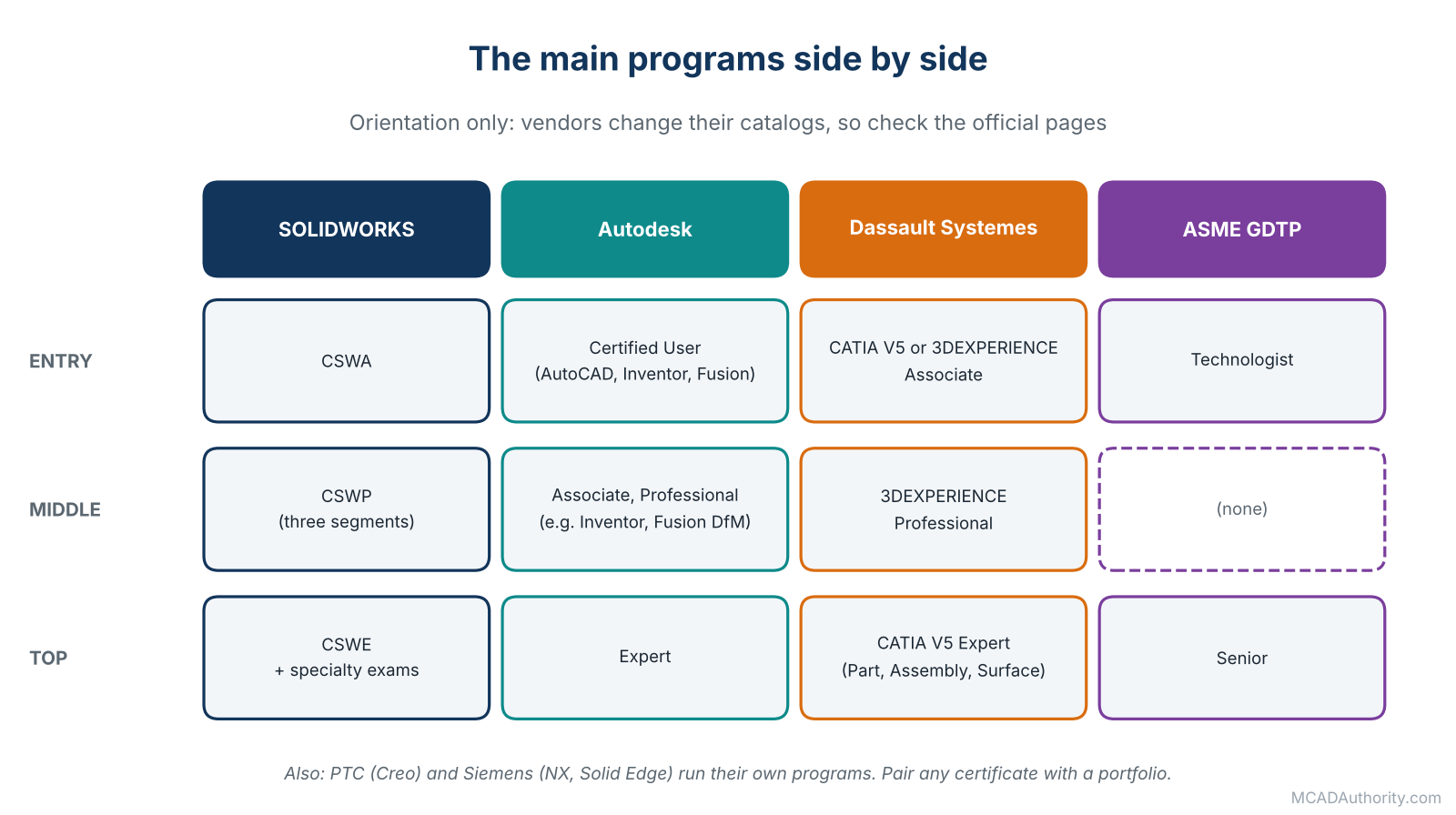
Figure 2. The main programs side by side (orientation only).
Treat this table as orientation. Details are changing and are set by the vendors.
Choosing: Which Certification Is Right for You?
Work through these questions in order.
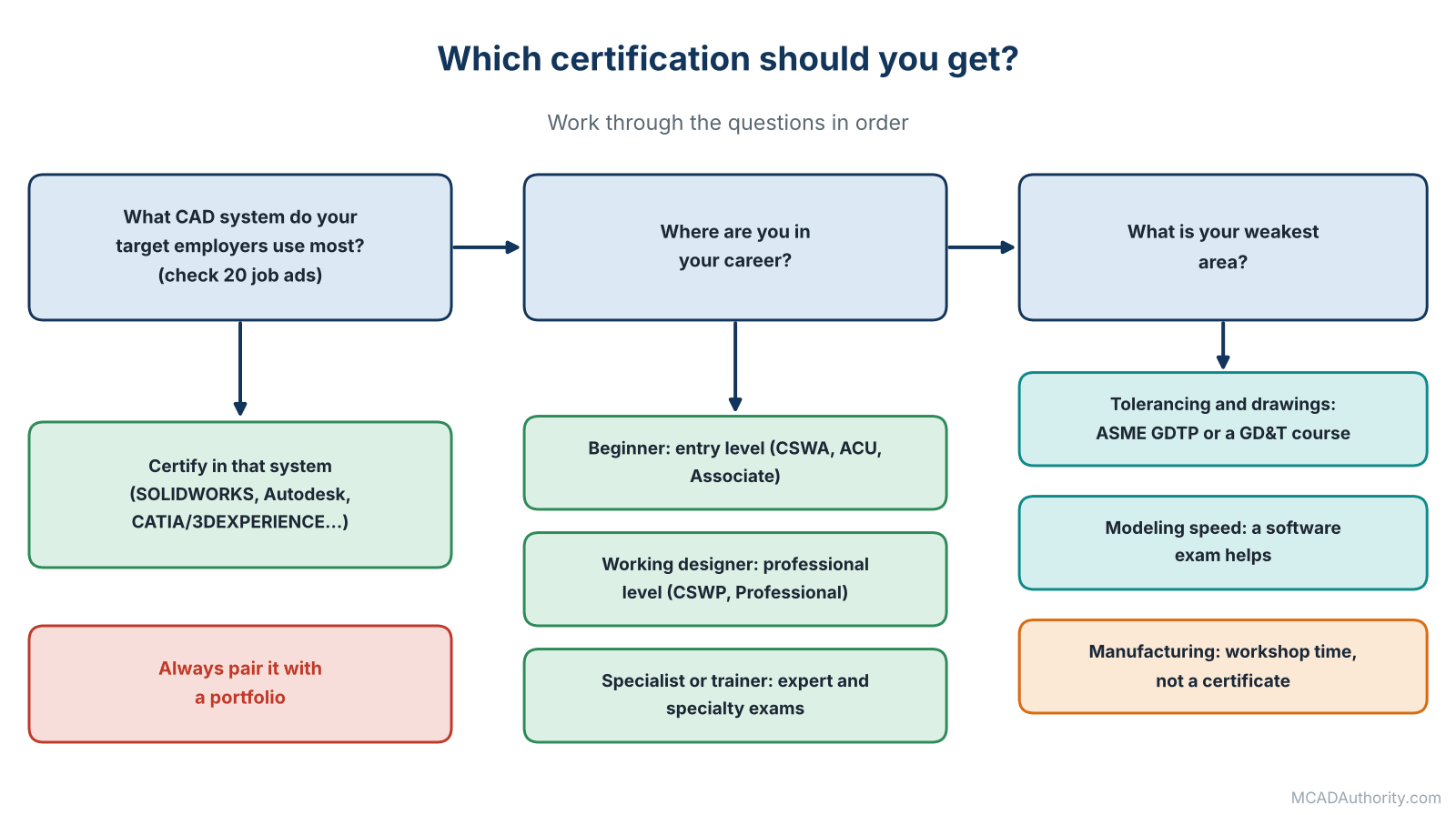
Figure 3. Which certification? Work through the questions in order.
1. What software does your target employer use?
Read twenty job advertisements in your region and industry. Count the systems and certifications mentioned. Certify in the software that appears most often.
2. Where are you in your career?
- Beginner or student: an entry-level exam (CSWA, Autodesk Certified User, a CATIA or 3DEXPERIENCE Associate) gives structure and a first credential.
- Working designer: a professional-level exam (CSWP, Autodesk Professional, 3DEXPERIENCE Professional) validates and sharpens daily skills.
- Specialist or trainer: expert levels or specialty exams demonstrate depth.
3. What gap do you want to close?
If your weakness is modeling speed and strategy, a software exam helps. If it is drawings and tolerances, GDTP or a good GD&T course matters more. If it is manufacturing knowledge, a software certificate will not help; spend the time in the workshop and on Design for Manufacturing (DFM) and Design for Assembly (DFA): A Complete Guide.
4. Who pays and what is the cost?
Compare exam fees, preparation time and retake rules. Some employers, resellers or subscription programs include exam vouchers or discounts, so ask before you pay out of pocket. Do the same for training courses.
5. How will you use it?
A certification is most valuable when listed in the right place: near the top of your resume for entry-level roles, referenced in your portfolio cover note, and available as a verifiable badge or certificate number where the program provides one.
How to Prepare Without Wasting Time
I have helped many people pass these exams, and the preparation pattern is remarkably consistent.
- Get the official exam objectives and read them like a contract. Every topic that can be tested is listed.
- Match the software version and settings the exam requires.
- Do timed practice. These are hands-on, time-limited exams. Speed with accuracy is part of the test, and it is trained only by timing yourself.
- Practice the exam format, not just the commands. Official practice material and sample exams are best; avoid unofficial “dumps”, which are usually outdated and may break the program’s rules.
- Learn your weak areas deliberately. After each practice test, write down what cost you time and repeat that skill.
- Build good habits for the exam itself: save your work frequently if the exam reuses models, read each question completely, check units and sketch orientation, and keep an eye on the clock.
- Do not cram the night before. Rest is worth more than one extra hour of practice.
- If you fail, analyze and retake. Most programs set a waiting period. Use it to practice the topics you missed.
For structured practice problems, Mechanical CAD Practice Exercises for Beginners and 20 Essential 3D Modeling Exercises for Mechanical Designers are useful companions.
Certification, Portfolio, Degree and Experience Compared
| What you offer | Strongest at proving | Weakest at proving |
|---|---|---|
| Certification | Tool skill under time pressure | Design judgment, communication |
| Portfolio | Real design ability and process | Speed under pressure; breadth in one specific tool |
| Degree | Theoretical foundation, persistence | Practical, current software skill |
| Experience | Everything, in real conditions | Skills outside your past employers’ tools |
The best candidates combine them. For an early-career applicant, I recommend a portfolio first, certification second: the portfolio gets you the conversation, the certification removes doubt about your tool skill. See How to Build a CAD Portfolio That Gets You Hired.
Mistakes People Make With Certifications
- Collecting certificates instead of building skills. Three entry-level badges are weaker than one portfolio project with a real drawing.
- Certifying in the wrong software. Check the market first.
- Skipping the official objectives.
- Studying only commands, not the strategies that make you fast.
- Using exam dumps. They are unreliable and risk disqualification.
- Letting certifications expire without noticing, where renewal is needed.
- Overstating the credential. “CSWA certified” is honest; “SOLIDWORKS expert” is not.
- Expecting a pay rise automatically. Certificates help negotiations, but pay is driven mainly by responsibility, industry and location. See MCAD Salaries and Job Outlook.
Are Certifications Worth It?
In my honest judgment: yes, when they are targeted, and no, when they are a substitute for real work.
They are worth it when:
- you are early in your career and need a credible first credential;
- your employers or clients explicitly ask for the certification;
- the cost is low or covered by someone else;
- the preparation closes real gaps in your skills;
- you pair it with proof of design ability.
They are less valuable when:
- you already have years of verifiable experience in that tool;
- the software is not used by the employers you want;
- the time would be better spent building a portfolio, learning GD&T or understanding manufacturing.
Final Thoughts
I have worked with certified people who could not design a simple bracket, and with uncertified people who could out-design everyone in the room. Neither fact makes certification useless; it just reminds us what it is: a clear, external measure of one important skill.
Use certifications the way a good designer uses any tool: for a defined purpose, at the right time. Pick the one your market recognizes, prepare with discipline, and then put the real energy where it matters most: building things, documenting them well and showing them to the world.
Where to go next: read How to Build a CAD Portfolio That Gets You Hired to turn your skills into proof, and MCAD Salaries and Job Outlook to understand how credentials fit with pay and demand.